What is an omnichannel retail POS system?
An omnichannel retail POS system connects in-store sales with online orders, product information, inventory, customer records and fulfilment. The aim is practical: a product sold at the counter should no longer appear available online, and an online pickup order should reach the store that will prepare it.
For Singapore retailers, this matters when one business sells from a mall unit, a second outlet and an ecommerce site. A conventional cash register can complete a store sale. A connected POS system for retail needs to answer what happens to stock and the customer’s order across every channel after that sale.
Search results for “retail POS” often list checkout, inventory and ecommerce as separate features. The real test is whether those features form one working process. This guide uses Lightspeed Retail X as the retail operating core and shows where EISOL adds the Singapore-specific connections around it.
One online order, one connected store workflow
Consider a shopper who finds an item online and chooses a store for collection. The online storefront confirms the order; Retail POS receives it for fulfilment; staff prepare it at the selected outlet; and connected inventory reflects the sale. This is the operational promise behind “buy online, pick up in store.”
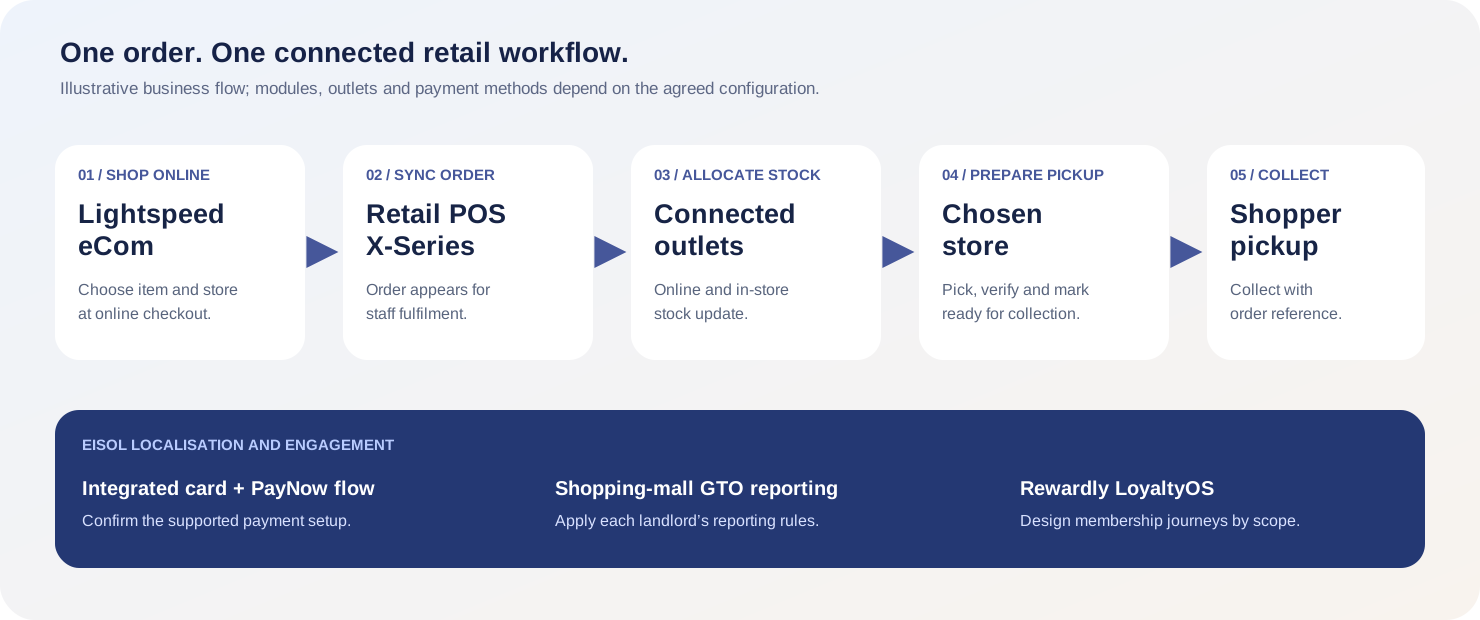
The diagram separates the core commerce journey from EISOL’s added services. Card and PayNow acceptance, shopping-mall GTO reporting and Rewardly membership should be scoped and tested against the retailer’s actual outlets and providers.
Why use Lightspeed Retail X as the POS system for retail?
Lightspeed Retail X, formerly Vend, combines selling with product, inventory, customer and reporting functions. A cashier can search or scan products, add a customer and complete a sale. Behind the counter, retail teams can manage variants, purchase orders, stock counts and transfers between stores. Those controls are useful when a retailer has many SKUs, several outlets or an ecommerce channel that depends on accurate availability.
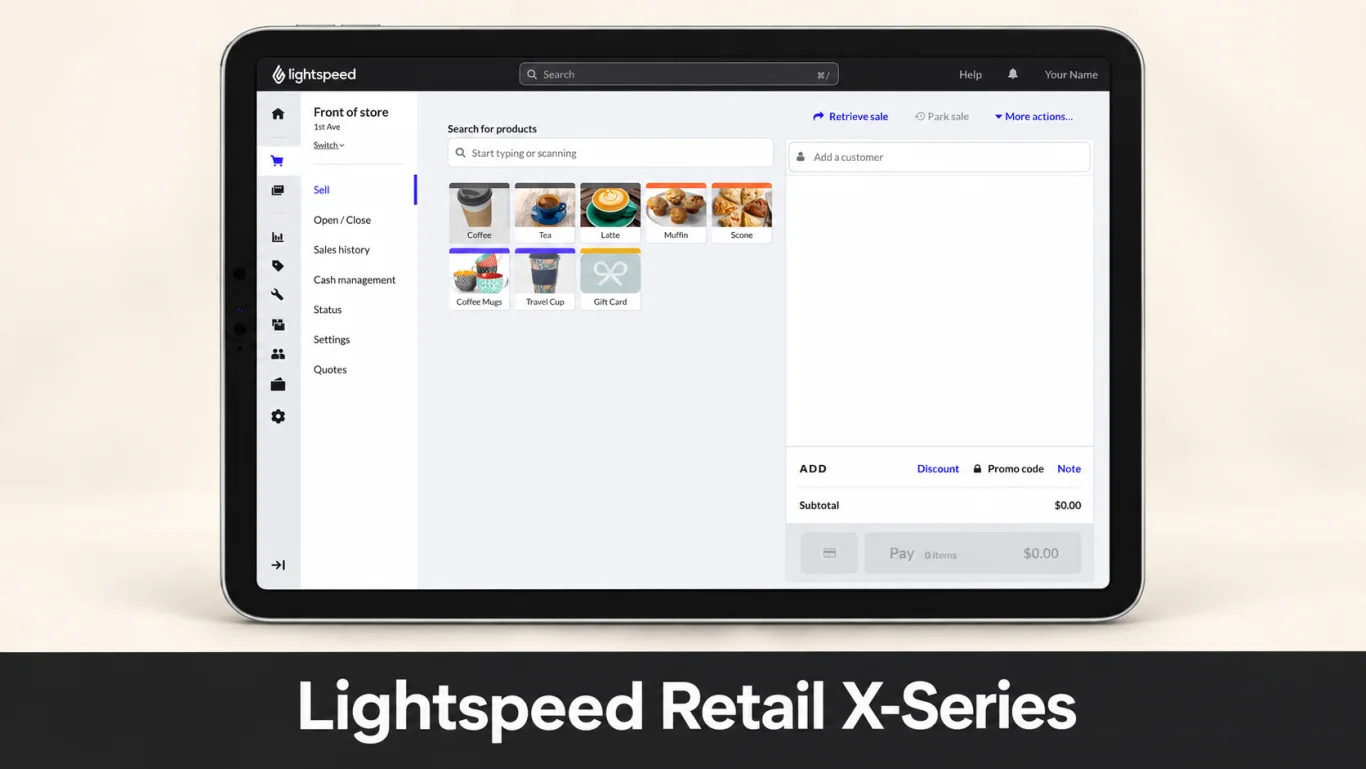
The value of advanced stock control is not just a dashboard. When staff receive stock, count a shelf, transfer items or process a return, the resulting inventory needs to be reliable enough for the website and the next cashier. EISOL maps those routine actions before a rollout, then tests the exceptions that usually reveal gaps.
Lightspeed eCom and Retail X: what actually synchronises?
With Lightspeed eCom (E-Series) connected to Retail POS X-Series, selected outlets supply stock to the online store. Retail POS is the inventory source of truth: supported product and stock changes flow to eCom, and a sale on either channel updates stock. Online orders appear in Retail POS sales history and fulfilment. Customer records can also synchronise, although existing profiles and customer groups may need initial matching or setup.
| Record | Expected flow | Acceptance test |
|---|---|---|
| Products and inventory | Retail POS controls the catalog and connected-outlet stock shown online. | Receive a SKU, sell it in-store and confirm the online quantity changes. |
| Online sales and fulfilment | eCom orders arrive in Retail POS sales history and the fulfilment queue. | Place a paid pickup order and check its status at the chosen outlet. |
| Customers | Profiles and selected details sync according to matching and setup rules. | Order with an existing email and check that staff see the right profile. |
Do not assume every field synchronises both ways. Lightspeed documents fields that stay in one system, and in-store sales do not become eCom orders merely because their stock updates online. Define which system owns each record and test refunds, cancellations and late updates before go-live.
Buy online, pick up at a chosen store
Lightspeed eCom lets a retailer configure connected outlets as pickup points. Shoppers can choose a participating store during checkout, while staff see the order in Retail POS and prepare it for collection. The associated stock adjusts when the online sale is recorded. This avoids manual re-entry and gives both the shopper and retailer a clearer handoff.
- 01 / ChooseThe customer orders online and selects an eligible pickup location.
- 02 / Reserve and routeThe order appears in Retail POS for the outlet responsible for preparation.
- 03 / PrepareStaff pick the item, verify the order and mark it ready.
- 04 / CollectThe customer arrives with the order reference; staff complete the handoff.
Already selling on Shopify? Keep the storefront and improve stock control
A Shopify merchant does not need to discard a working storefront to adopt Lightspeed Retail X for physical stores. Lightspeed’s Shopify integration can bring online orders, associated customer details and inventory changes into Retail POS. That gives the retailer tools for purchase orders, counts, transfers and multi-outlet stock while Shopify continues to handle the online shopping experience.
The implementation needs a clear system of record. Lightspeed advises merchants to manage synced catalog, prices and inventory in Retail POS; changing the same information in Shopify can cause conflicts or overwritten values. Shopify customers usually reach Retail POS when they place an order, and some Retail POS features—such as its built-in loyalty, gift cards or price books—do not automatically work across Shopify. EISOL should test the exact catalog, order, refund and pickup paths before declaring the integration ready.
For a Shopify seller, the practical question is: can store staff count and transfer one SKU in Retail X, then trust the quantity presented online? That is more valuable than a generic “Shopify compatible” badge. See EISOL’s retail POS integration checklist for the acceptance tests.
Singapore localisation: mall GTO and integrated card and PayNow payments
Singapore retail operations add requirements that a generic international POS plan may not cover. For a tenant in a shopping mall, gross turnover (GTO) submissions must follow that landlord’s rules and file format. EISOL’s EIX GTO integration can automate qualifying-sales mapping, scheduled reporting and exception follow-up. Online sales should be classified according to the applicable lease and mall specification rather than blindly included or excluded.
EISOL also connects supported card and PayNow payment flows to Lightspeed Retail X. The cashier should be able to start from the sale, receive the payment result and know whether to hand over the goods, instead of typing the amount twice and reconciling later. The exact provider, terminal, PayNow method and approval process must be confirmed for each project. Together, payment integration and GTO reporting give a POS for shopping mall operations a more complete daily workflow.
Extend membership with Rewardly LoyaltyOS
When a retailer wants more than basic discounts, EISOL can connect Rewardly LoyaltyOS to the Lightspeed Retail X transaction journey. The merchant can design membership tiers, points, stamps, vouchers or other reward rules around its own customers and campaigns. The value is engagement after the first sale: recognising a returning shopper, earning the right reward and seeing how a promotion performs.
This is a scoped EISOL integration rather than a claim that every Lightspeed subscription includes Rewardly by default. Membership identification, consent, earning, redemption and refund reversal should be demonstrated against the exact store and ecommerce channels the retailer will use. For merchants retaining another POS, Rewardly Sentry offers a separate route to loyalty without a full platform change.
How to choose an omnichannel retail POS in Singapore
Ask every shortlisted supplier to run the same product and customer scenario. Start with one SKU in two stores, then make an online pickup order, a counter sale, a stock transfer and a refund. Watch where each record appears and who fixes a mismatch. A realistic demo is more informative than a long feature list.
| Area | What to verify |
|---|---|
| Availability | Which outlets feed online stock, and how quickly does a sale or count change availability? |
| Pickup | Can shoppers select a store without local stock? If yes, who transfers the item and sets the collection promise? |
| Customer | How are online and in-store profiles matched, and what consent is carried across? |
| Payment | Which card and PayNow methods are integrated, and how are failed or duplicate attempts resolved? |
| Mall GTO | Which transactions qualify under the lease, and who verifies the first submission with the mall? |
| Commercial scope | Which eCom, Shopify, loyalty and support components are included in the written quote? |
EISOL has worked with Vend, now Lightspeed Retail X, since 2019. It brings consultancy and development together: mapping the retailer’s operating model, configuring the platform and building the missing local connections. EISOL positions this long-running practice among Singapore’s most experienced Lightspeed specialist teams; the practical proof is a scoped demonstration and accountable rollout plan.
Omnichannel retail POS questions
What is the difference between a retail POS and an omnichannel retail POS?
A retail POS records store transactions and helps manage products, stock and customers. An omnichannel setup connects those records with ecommerce orders and fulfilment so store and online teams work from consistent information.
Does Lightspeed Retail X work with Lightspeed eCom and Shopify?
Yes, through separate supported integrations. Lightspeed eCom connects catalog, inventory, online orders and customer workflows with Retail POS. Shopify can remain the storefront while Retail POS manages synced products and stock. Data rules and feature compatibility differ, so test the selected path.
Can customers buy online and collect from any store?
A retailer can configure participating outlets as pickup points. Whether shoppers may select an outlet without enough stock depends on pickup rules. If that is allowed, a stock transfer and realistic collection time may be needed; the safer alternative is to show only outlets with sufficient inventory.
Does a retail POS automatically meet Singapore mall GTO requirements?
No. Mall formats and qualifying-sales rules vary. EISOL’s EIX integration can be scoped to map and submit the right sales data, with verification against the landlord’s specification.
Can Rewardly LoyaltyOS work with Lightspeed Retail X?
EISOL offers a scoped integration that can connect Retail X transactions with Rewardly membership and reward workflows. Confirm the channels, identification, earning, redemption and reversal rules in a demonstration.
Make online and in-store selling work as one operation.
Bring your stores, SKU list, ecommerce platform and mall requirements. EISOL will map a practical Lightspeed Retail X rollout and the integrations it needs.
Book an omnichannel POS consultationProduct documentation used for this guide
Feature availability, plans and integration behaviour can change. These Lightspeed support pages explain the specific workflows discussed above:
- How Lightspeed eCom orders work with Retail POS X-Series
- Setting up pickup for Lightspeed eCom
- Pickup and delivery availability by outlet stock
- Retail POS X-Series and Shopify integration
- Customer sync between Retail POS and eCom
Sources checked on 2 October 2026. EISOL-specific integrations are described according to the agreed implementation scope.